
What custom fields is
Custom fields is a premium feature in Decisions that allows organizations to define their own custom fields and values at the organization level. Once defined, values can be applied to any topic across the organization, wherever the topic exists.
Custom fields is designed for organizations that need a more structured way to classify meeting content, so it can be tracked, filtered, and reported on in a way that fits the organization. Custom fields and their values can reflect categories the organization already uses, such as project codes, product lines, business areas, risk levels, or compliance categories.
This helps organizations make meeting content meaningful inside their wider operating context.
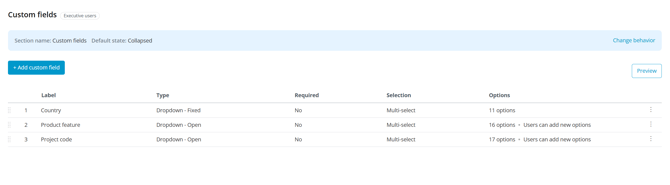
Custom fields are managed centrally at the organization level. Admins can see all defined fields, their type, and how many options each one has.
How custom fields works
With custom fields, organizations can:
- define custom fields and values centrally at the organization level
- set each field as required or optional, single or multi-select, and admin-controlled or open for users to add new values
- apply values to any topic across the organization, on agendas, topic suggestions, or case submissions
- apply values where relevant, leave them unused where not
- filter, search, and report on content using applied field values
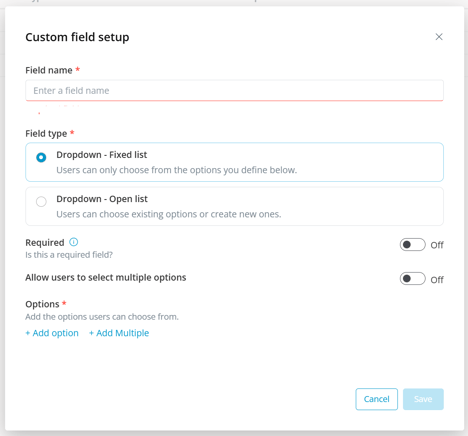
Each custom field can be set as required or optional, configured for single or multi-select, and either limited to a fixed list of options or open for users to add new values.
Fields are defined once at the organization level and become available across the organization. Values can be applied to any topic, with no requirement to use every field on every topic. This means a shared classification model can be used across the organization while still being applied selectively, only where it adds meaning.
Topics can enter the workflow from anywhere, whether created directly in a meeting, raised as a suggestion, or submitted as a case from outside the meeting. Custom field values can be applied as soon as a topic enters the workflow, and they travel with the content through the full lifecycle: before the meeting, on the agenda, in the minutes, in the shared decision log, and into Advanced Reporting.
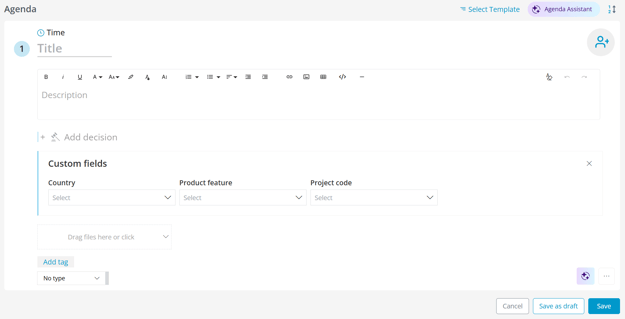
Once defined, custom field values appear on agenda items, topic suggestions, and case submissions, where they can be applied to the topic.
A custom field value is applied at the topic level, and the connection extends outward from there:
Organization
│ custom fields and values are defined here
▼
Meeting
│ connects to every custom field value used in any topic inside it
│
├── Meeting-level content
│ minutes, meeting book
│
└── Topic
│ custom field values are applied here💡
│
└── Related content
decisions, attachments
Because the connection runs both up to the meeting and outward to related content, a single value applied to a topic surfaces across many related artifacts when using Advanced Reporting or Detailed Search to locate the right content.
NOTE: Although custom fields are shared across the organization, they do not change who has access to what. Users only see content they already have access to, regardless of which custom fields are used elsewhere in the organization. For users who need read-only visibility across teams they are not part of, Advanced Reporting provides that view for approved users. Learn more: Advanced Reporting: what it is and how it works.
Who custom fields is for
Custom fields is for organizations that need a shared, consistent way to categorize meeting content across teams. This is relevant when:
- teams across the organization work on shared projects, product lines, areas, or initiatives
- meeting content needs to be searchable and groupable by business context over time
- a shared categorization model is used across regions, teams and functions
- structured content needs to surface across teams, including through Advanced Reporting
This is valuable when work and decisions span multiple teams and need to be tracked consistently over time.
Common use cases
Organization-wide classification
Define a shared classification model once at the organization level and apply it to topics across the organization, using the fields that are relevant to each topic.
Project or initiative classification
Support organizations that run many parallel initiatives and need to group content by project, program, or workstream across teams.
Compliance and risk categorization
Apply custom field values that reflect compliance, risk, or regulatory categories so content can be tracked and reviewed in a structured way across the organization.
End-to-end traceability across the meeting lifecycle
Classify a topic and keep that classification connected to its related decisions, attachments, and meeting content, visible across agenda, minutes, decision log, and reporting.
How to get more information or request access
Custom fields is a premium feature.
To get the conversation started, send us an email at - support@meetingdecisions.com.