
Prerequisites:
- AI features are enabled for your organization (admin controlled).
- Your organisation allows for meetings to be recorded and/or transcribed.
- A Teams transcript or recording is available for the meeting.
Decisions does not use customer content to train or improve AI models. When Decisions AI is enabled, meeting content is processed transiently and statelessly using Azure OpenAI, strictly to deliver the requested functionality. Inputs and outputs are not stored, logged, or reused for training by Decisions and all generated content is saved only in the customer’s Microsoft 365 tenant, which remains the system of record. More details on our security, privacy, and AI practices are available in our Trust Centre: https://trust.meetingdecisions.com.
Generate the AI Meeting Recap
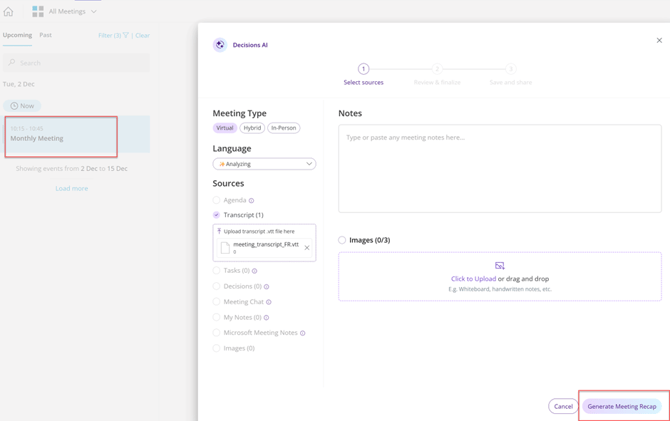
- Identify the meeting on your Decisions dashboard that needs a recap. Click Generate Meeting Recap.
- Select sources and click Generate meeting recap.
Review and edit the AI Meeting Recap
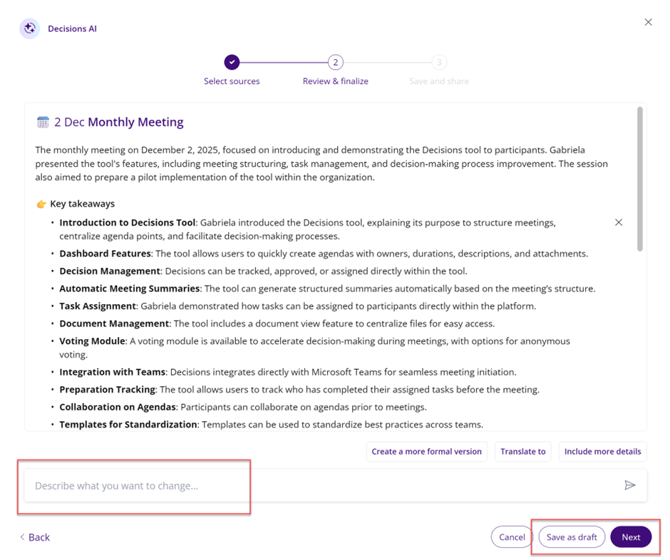
- Scan the output for key takeaways, decisions, and tasks. Edit directly in the recap or use the Describe changes field to request updates (e.g., replace X with Y).
- Save as draft to finish later, or continue to sharing.
Share the Meeting Recap
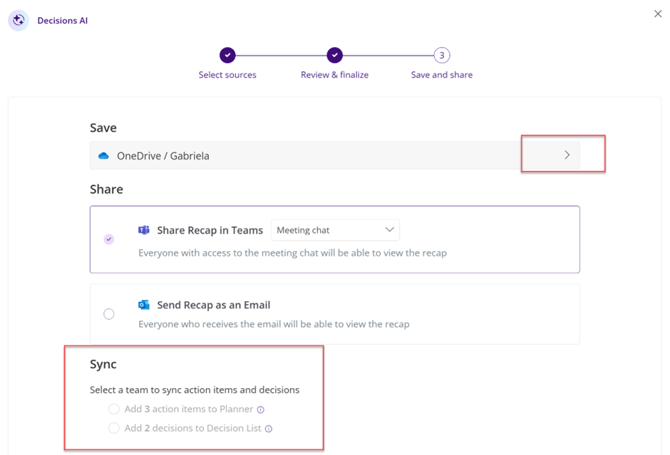
- Share in Meeting Chat to keep the conversation in context.
- Post to a Teams channel so a wider audience can view it.
- Send by email to also reach external stakeholders.

Sync the AI generated tasks and decisions
- You can choose to sync tasks and decisions to Team area
- Or select a Teams team (if one was not already used for agenda creation). This connects action items to the right workspace.
FAQs for AI Recap
- Can I regenerate the recap? Yes. You can generate again using the same or different sources.
- Who can see the recap? Visibility matches where you share it: Meeting Chat, Teams post, or email. It will also be published on the Decisions dashboard.
- Who can generate a recap? The meeting organiser, as well as the attendees, although the later may have limited options when it comes to storage locations.
Troubleshooting for AI Recap
- The transcript does not show up as a source for a meeting which has just ended. The transcript might not be fully processed yet, so try again later.
- The transcript does not show up as a source for a meeting which ended much earlier. Check that the transcript is available in the meeting's Teams chat.
- I am a meeting attendee and I cannot generate a recap. Ensure that your organisation has not disabled this option.
Tip: You can also use the Decisions AI mobile app to record and create recaps, which is best suited for in-person and hybrid meetings.