
Why this matters
- AI Recap and AI Minutes are built from the meeting transcript, so Decisions needs a transcript it can reach and the person creating the summary needs access to it.
- When Only during the meeting is selected, Copilot runs on temporary speech to text that Microsoft handles live and clears at the end of the call. No Teams transcript is produced, so there's nothing for Decisions to pick up.
- Copilot still works normally during the call, which is why this is easy to miss. Users see Copilot taking notes and reasonably assume a transcript was captured.
- IMPORTANT: Two separate sets of controls are involved. The Copilot option decides whether there's a transcript at all. The Recording & transcription options decide who can start it and who can open it afterwards.
Where to find these settings
- Create your meeting in Teams or Outlook, select Teams meeting, then open Meeting options
- Copilot and other AI holds the Allow Copilot setting
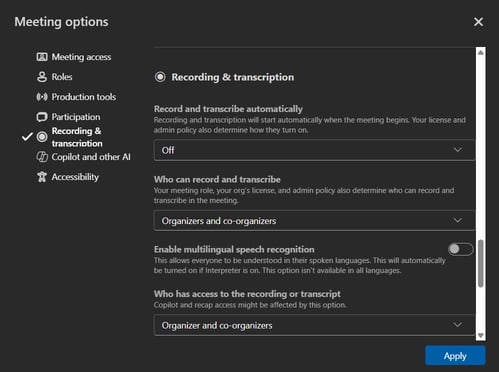
- Recording & transcription holds the transcription and access settings
- Select Apply to save your changes
- On a recurring meeting, open the series rather than a single occurrence, otherwise the change only applies to that one
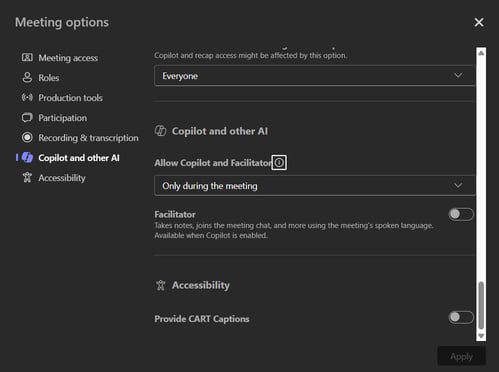
Allow Copilot
| Option | AI Recap and AI Minutes |
|---|---|
| During and after the meeting | Available. Teams produces a transcript that Decisions can use |
| Only during the meeting | Not available. Copilot runs on temporary speech to text and no transcript is produced |
| Off | Not available. Recording and transcription are turned off for the meeting |
- Set this to During and after the meeting. The transcription needs to be started during the call, unless Record and transcribe automatically is turned on. (See below)
- Off does more than disable Copilot. It also blocks recording and transcription for that meeting, so nobody can start one. Microsoft covers this behavior in Manage Microsoft Copilot in Teams meetings and events.
Recording & transcription settings
- Record and transcribe automatically starts both as soon as the meeting begins, so nobody has to remember. Set it to On if you want AI Recap and AI Minutes every time. See How to Turn on Automatic Recording and Transcription for Teams Meetings.
- Who can record and transcribe sets who is able to start it during the call. If it's limited to organizers and none of them start it, there's no transcript, even with the Copilot option set correctly.
- Who has access to the recording or transcript sets who can open it afterwards. If its set to Organizer and co-organizers then standard attendees can't create their own Recap or Minutes. If this is required, set it to Everyone.
Microsoft documentation
- Use Copilot without transcribing or recording a Teams meeting or call: https://support.microsoft.com/en-US/teams/copilot/use-copilot-without-transcribing-or-recording-a-teams-meeting-or-call
- Manage Microsoft Copilot in Teams meetings and events (Microsoft Learn): https://learn.microsoft.com/en-us/microsoftteams/copilot-teams-transcription
- Manage transcript API access for Teams meetings (Microsoft Learn): https://learn.microsoft.com/en-us/microsoftteams/meeting-transcript-api-access
FAQ
- Copilot worked during my meeting, so why can't Decisions generate a Recap?
- The meeting was most likely set to Only during the meeting. Copilot running live doesn't mean a transcript was produced.
- Can we go back and get the transcript from a meeting that already happened?
- No. Change the setting on the series or on future meetings.
- Attendees can't create Minutes but the organiser can. Why?
- Who has access to the recording or transcript is set to Organizer and co-organizers. Change it to Everyone if attendees need their own Recaps and Minutes.
- I don't see the Copilot and other AI section in Meeting options.
- Copilot options only appear where Copilot is available to your organisation. Check with your IT admin if it's missing.
- I'm an admin. What else needs to be in place across the tenant?
- Transcription allowed in your Teams meeting policy
- Microsoft Graph access turned on under Transcript API access. See How to enable Decisions enterprise app to integrate with transcripts via Graph API
- Decisions AI enabled in the Decisions Admin Portal with the Decisions AI permission set consented.