
With Decisions, you don’t need to convert files to PDF before uploading them to an agenda. You can attach common formats like Word, PowerPoint, Excel, and more, and then convert to PDF later when it makes sense.
Many organizations prefer PDFs because they’re easier to share, consistent to view across devices, and simple to archive. Decisions makes it easy to convert attachments without changing your agenda workflow.
How to convert an agenda attachment to PDF
-
Open the meeting Agenda in Decisions
-
Go to the Agenda item that contains the attachment
-
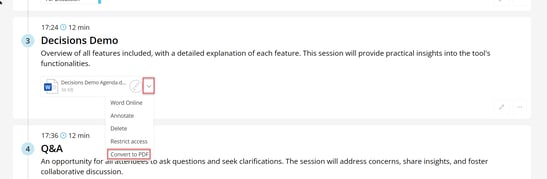
Find the attachment you want to convert
-
Click the attachment dropdown menu
-
Select Convert to PDF
Why convert to PDF?
-
Consistent formatting when sharing on-screen in Teams or in a meeting room
-
Easier reviewing for pre-reads and stakeholder sharing
-
Simpler archiving for governance or recordkeeping
Tip: If you need a single document to share, you can compile the agenda plus all attachments into one PDF using a Meeting Book. This is ideal for pre-reads and offline review. See: How to create a Meeting Book.