
Copy or move an agenda item
-
Open the meeting Agenda that contains the agenda item
-
Find the agenda item you want to reuse
-
Select More options (...) on the agenda item
-
Select Copy to or Move to
-
Choose the destination meeting
-
Select Copy/Move
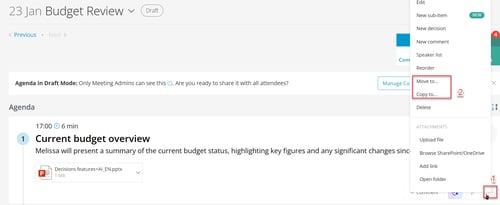
Copy keeps the agenda item in the original meeting and creates a duplicate in the destination meeting.
Move removes the agenda item from the original meeting and places it in the destination meeting.
If the destination meeting doesn’t show up (standing agendas)
If you’re using a standing agenda, the destination meeting might not appear as an option.
-
Go to the destination meeting’s Agenda
-
Make a small change (for example, change punctuation in any agenda item)
-
Return to the original meeting and try again: More options → Copy or Move
This feature is not yet supported for meetings stored in a private or shared channel.