
Advanced Search — Find anything in your team's meeting history
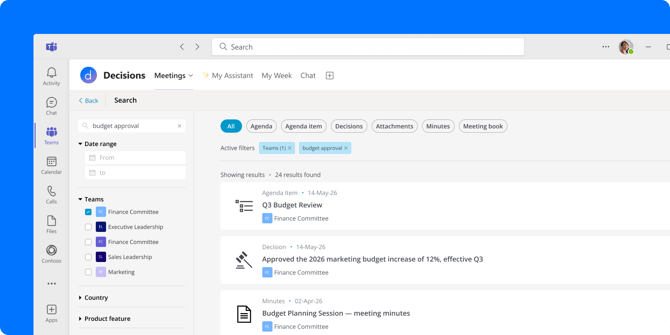
Everything your team has ever discussed, decided, or documented in Decisions is now retrievable in seconds. No more digging through past meetings to answer questions like these:
"What did we decide about the new policy last quarter?"
"Where are all the attachments from this year's board meetings?"
"What was that task someone mentioned a few months ago?"
It's called Advanced Search, and here's how it works:
-
Find anything, no context needed – Just type what you remember. Every agenda item, decision, task, and attachment is searchable in one place.
-
Narrow it down fast – Filter by date range, content type, or tag to cut straight to what you need.
-
See everything across teams – Results pull from every team you have access to.
Find Advanced Search in the upper right menu.
Custom instructions for AI meeting summaries (beta)
AI meeting summaries now include a Custom Instructions option, giving you full control over how your minutes or recap are generated. Instead of choosing from a preset format, you can type whatever you want — tone, structure, focus areas, length — and Decisions AI builds the summary around your instructions.
To use it, select the Custom format when generating minutes or a recap, then type your instructions in the free-text field. You can ask for an executive summary up front, request that the AI focus only on outcomes rather than discussion, or specify a formal tone for stakeholders who weren't in the room.
Automatic recaps now use the same upgraded AI engine
The AI for automatic meeting recaps has been upgraded to match the same architecture that powers manual recaps. The summaries landing in your inbox and meeting chat are now sharper and more precise — with no changes needed on your end.
A smoother experience when editing AI output
The chat interface you use to refine AI Agendas and AI Recaps and Minutes has been polished across the board. It's now easier to tell AI messages apart from your own, the prompt input is more seamless, and the Suggestions feature is sharper and more relevant.
One of the most useful improvements is the clearer scope selector. When you're making a change, it's now easier to see whether you're editing a single agenda item or the whole document — so you can iterate with more confidence and less second-guessing.
Restore deleted meetings
If a meeting gets deleted by mistake, a new self-service restore flow lets you recover the meeting directly from your settings in just a few clicks.
When Decisions detects that a meeting's SharePoint folder is missing, you'll see a prompt with two options: restore it automatically from the Recycle Bin, or open the Recycle Bin yourself to manage it manually. In either case, the agenda and related files will be back where they belong.
This is especially useful for admins and frequent meeting organizers.
Swap a presenter without notifying the whole meeting
When you update a guest presenter on an agenda item, you can now choose to notify only the person being added or removed — not the entire invite list. When the change is made, select "Only added or removed" to keep it quiet, or "Everyone" if the update is relevant to all attendees.
This is especially useful for larger meetings where a presenter swap would otherwise trigger a "meeting updated" email for the entire invite list.
A faster, more flexible meeting dashboard
Finding the meeting you're looking for just got easier. The dashboard calendar has been redesigned with infinite scrolling — so instead of toggling between Upcoming and Previous tabs, you can scroll freely in either direction. A new date selector lets you jump to any week quickly, and the overall navigation is significantly faster.
Your search filters and group selections are also now remembered when you open an agenda or come back, so you no longer have to reapply them each time. The dashboard picks up where you left off.