
AI Recaps & Minutes – Updated AI, better output
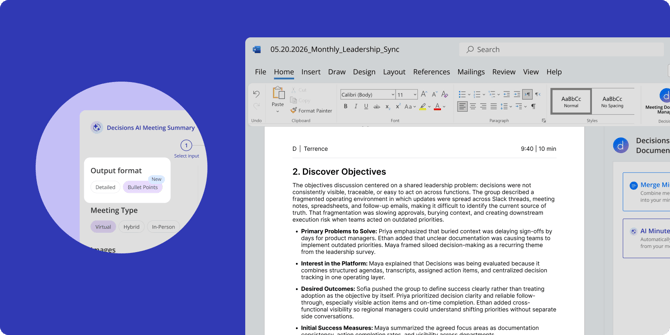
The AI Recaps and Minutes you rely on just got a major upgrade! Here's what changed and why it matters:
-
More accurate and concise – The upgraded AI generates sharper takeaways and cleaner decisions and action items. That means more substance and less editing.
-
New format option – Bullet Point formatting is now available for AI Minutes. Perfect when meetings cover a lot of ground and you need a scannable summary instead of long paragraphs.
-
Smarter AI modifications – When you ask AI to revise a draft, the results are now significantly better. Refine the full document or target a specific section — try asking for more detail, more focus on a particular topic, or a different style that fits your team.
Reorder agenda items with live time updates
When rearranging your agenda, it helps to see exactly how your changes affect the schedule. The reorder dialogue now shows the start time and duration for every item, so you always know where things land before you commit.
Simply drag and drop items into your preferred order and the start times update dynamically as you move things around. There's no guesswork — you can see the full picture of your agenda timing in real time.
Edit individual agenda item descriptions with AI
Sometimes you don't want to regenerate your entire agenda — you just want to tweak one item. The AI Agenda Assistant now supports targeted edits, so you can update the description of a single agenda item without touching the rest.
Select any item's description, then either type your change directly or describe what you want using a prompt. The assistant will update just that item, leaving everything else intact.