
Create Tasks
Note: Tasks can be created for specific Agenda Item or the entire meeting
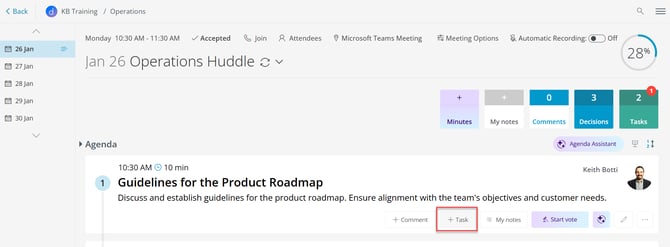
- Create tasks from Agenda
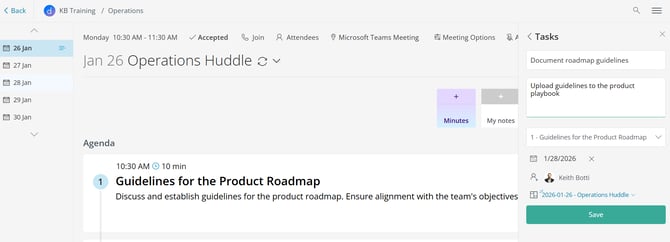
- For an Agenda item, click on + Task to create a task to open the right side panel
View and Manage Tasks
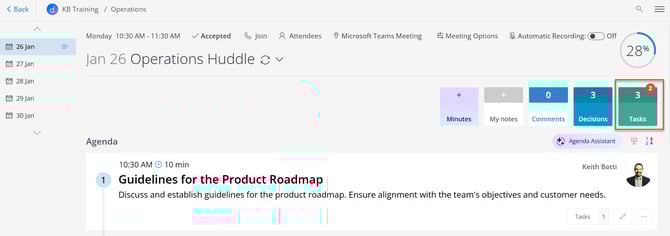
- Decisions Agenda
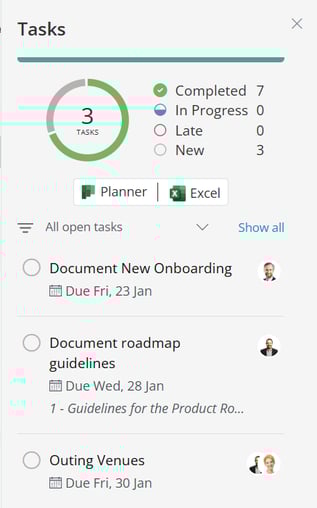
- In the Decisions Agenda you will see the number of open Tasks in the Planner Plan for that team/group/channel and can click on the link to open it in Planner or download the tasks to Excel via the green box
-
-
Tasks can be marked as completed from the agenda or in Planner
-
- Planner
-
- In Planner you can see all the open tasks for the plan for each team/group/channel
- Decisions supports users Creating buckets to sort tasks
- Tasks can be moved from one bucket to another within the same plan
- View Planner dashboard here
- To Do
- The Microsoft To Do app shows you all tasks assigned to you across different Planner plans, and is a great app to get your personal view
- Learn more about Microsoft To Do
- Teams
- Channel Tab
- Teams App - Tasks by Planner and To Do
Note: Decisions supports tasks created from meetings tied to private channels. Our solution automatically creates the plan using Rosters in Microsoft Planner