
Not every decision is made in the same way.
Some teams reach decisions through discussion in the meeting. Some teams prefer a formal vote. Others want decisions to include role-based approvals before the decision becomes final.
In all of these cases, one thing matters: decisions should be documented in a structured and visible way. When decisions are captured clearly, the team can see what was agreed, return to it later, and move forward with better alignment and accountability.
For many users, standard decision logging is the process they know best. It gives teams a clear way to capture decisions as part of the meeting flow. But in Decisions, decision-making can be supported in different ways depending on how the team prefers to work.
Decisions supports three decision-making processes:
-
Standard decision logging
-
Voting
-
Structured approvals
Standard decision logging is available to all users. Voting and structured approvals are premium features.
Standard decision logging
Standard decision logging is the foundation for documenting decisions in Decisions.
It allows teams to create proposed decisions on draft or published agendas, discuss them during the meeting, and mark them as final once the team has agreed on the outcome. Final decisions are then visible on the agenda, included in meeting summaries and in the decision log, making them easy to revisit later.
Standard decisions can also be captured by AI based on the discussion in the meeting. These decisions can then be included directly in meeting minutes and recaps, while also being logged in the shared decision log. This helps teams move from conversation to documented outcome with less manual work.
For many teams, this is exactly the right level of structure. It ensures that decisions are not lost in meeting notes, chat messages, or memory, but captured in a consistent place where the team can find them again.
Even at this level, the value is significant. A documented decision is clearer, more visible, and easier to follow up on than an informal agreement that lives only in conversation.
Example: A finance team discusses a budget adjustment in its weekly meeting. The agreed outcome is captured as a decision, included in the meeting recap, and logged for future reference.
Voting
Voting is a premium feature.
Some teams want a more structured way to reach and document a decision. Voting supports that process.
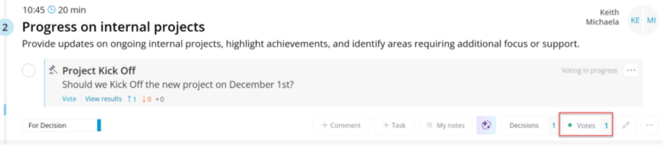
With voting in Decisions, participants can vote directly in Microsoft Teams through the meeting chat, the Decisions side panel, or mobile. Depending on the needs of the team, voting can be configured as open, partially anonymous, or fully anonymous.
The result is recorded together with the decision, creating a clear record of how the outcome was reached.
Voting can be especially helpful for boards, committees, and governance teams, but it is not limited to those settings.
Example: A board committee votes on whether to approve an annual plan, and the outcome is recorded together with the decision.
Learn more about voting here: How to Vote during a meeting.
Structured approvals
Structured approvals is a premium feature.
Some teams want decisions to include approval from specific roles before the decision becomes final. Structured approvals support this type of process.
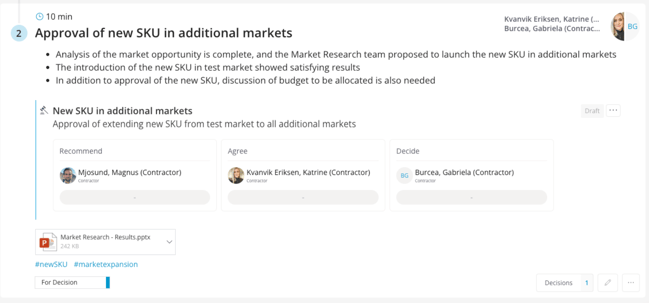
With structured approvals, organizations can assign approval roles within the decision-making team and require those approvals before the decision becomes final. This can reflect established frameworks such as RACI or RAPID, or a custom structure defined by the team. Structured approvals also support approvals outside of meetings, making it possible to complete approvals between meetings when needed.
This provides stronger traceability, accountability, and visibility around how a decision is finalized. It helps ensure that the right members of the team approve the decision, and that the approval path is documented as part of the decision record.
Structured approvals can be especially valuable in governance-focused environments, but they are not reserved for only the most formal use cases.
Example: A steering committee discusses a proposal in a meeting, and the decision becomes final only after the assigned approval roles within the committee have approved it.
Learn more about Structured approvals here: Running a meeting with Structured Approvals.
From documentation to governance
The three decision-making processes in Decisions support different ways of working.
-
Standard decision logging helps teams capture and revisit decisions in a clear, structured way, whether they are added directly to the agenda or captured by AI from the meeting discussion.
-
Voting adds structured participation and a transparent result for teams that want decisions to be made through voting.
-
Structured approvals add role-based accountability for teams that want approvals to be part of how decisions are finalized.
The examples above show common use cases, but they are not strict boundaries. Teams can choose the process that best fits how they want to work.
This means Decisions can support not only everyday team decisions, but also more structured and governed decision-making processes when needed, all within the same meeting workflow.