
Overview of org-wide agenda templates
Org-wide agenda templates let your organization standardize meetings across teams and business units. Org-wide templates can be used by everyone in your organization.
Configuring org-wide templates
- Learn how to deploy org-wide artifacts in Decisions
Create new org-wide agenda template
1. Access an existing, published agenda in Decisions for Teams or Decisions for Web. Click on the 3-line main menu in the upper right corner and click "Save agenda as a template."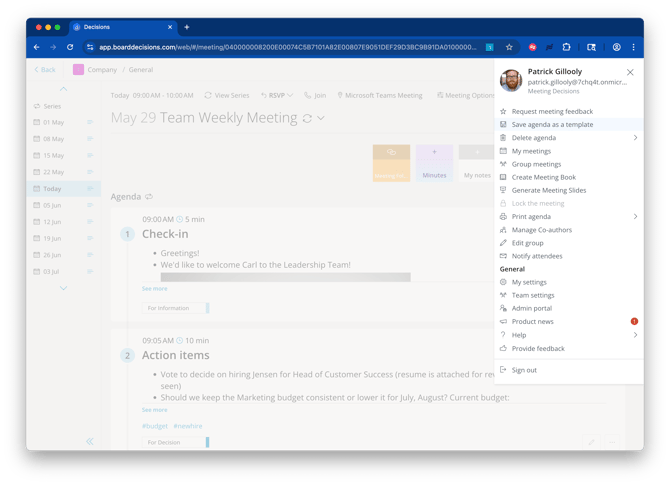
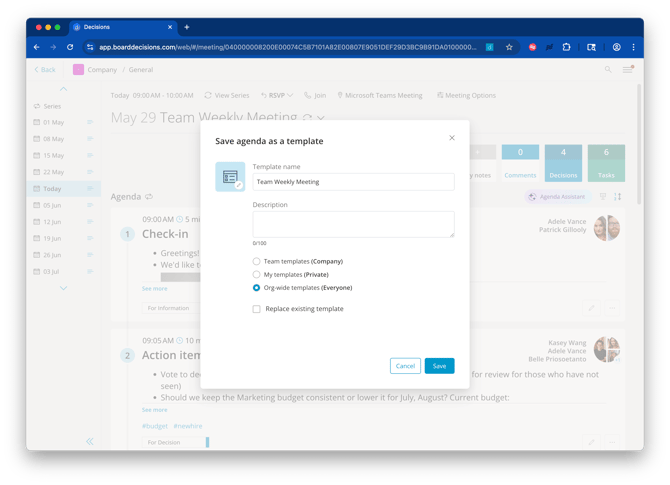
2. Name your template and add some information to the description box for background info, and select the "Org-wide templates (Everyone)" radio button.
How to import a previously saved agenda from global templates
1. Click on the "Select Template" option when starting the Agenda (options may vary in location if you start the agenda from Outlook). 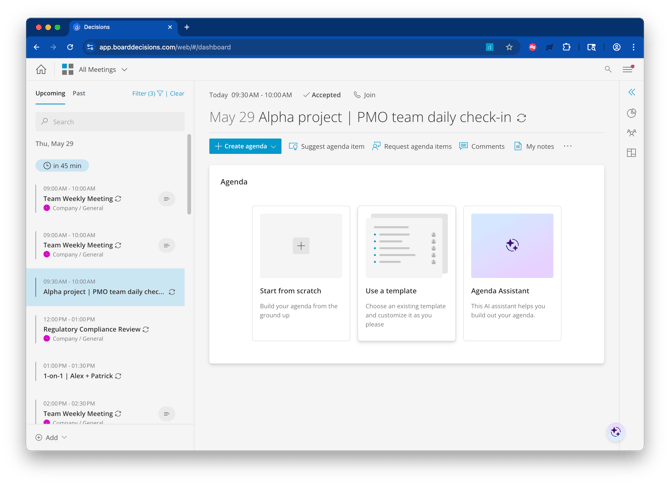
2. Select from any of the available templates. "Org-wide templates" and your personal templates will show for every meeting. Team-specific templates will only show for meetings stored to that specific team. 
3. Select the template you want and pick 'Apply'
